
Docs / Basics
Dashboard
Your widget board and date ranges.
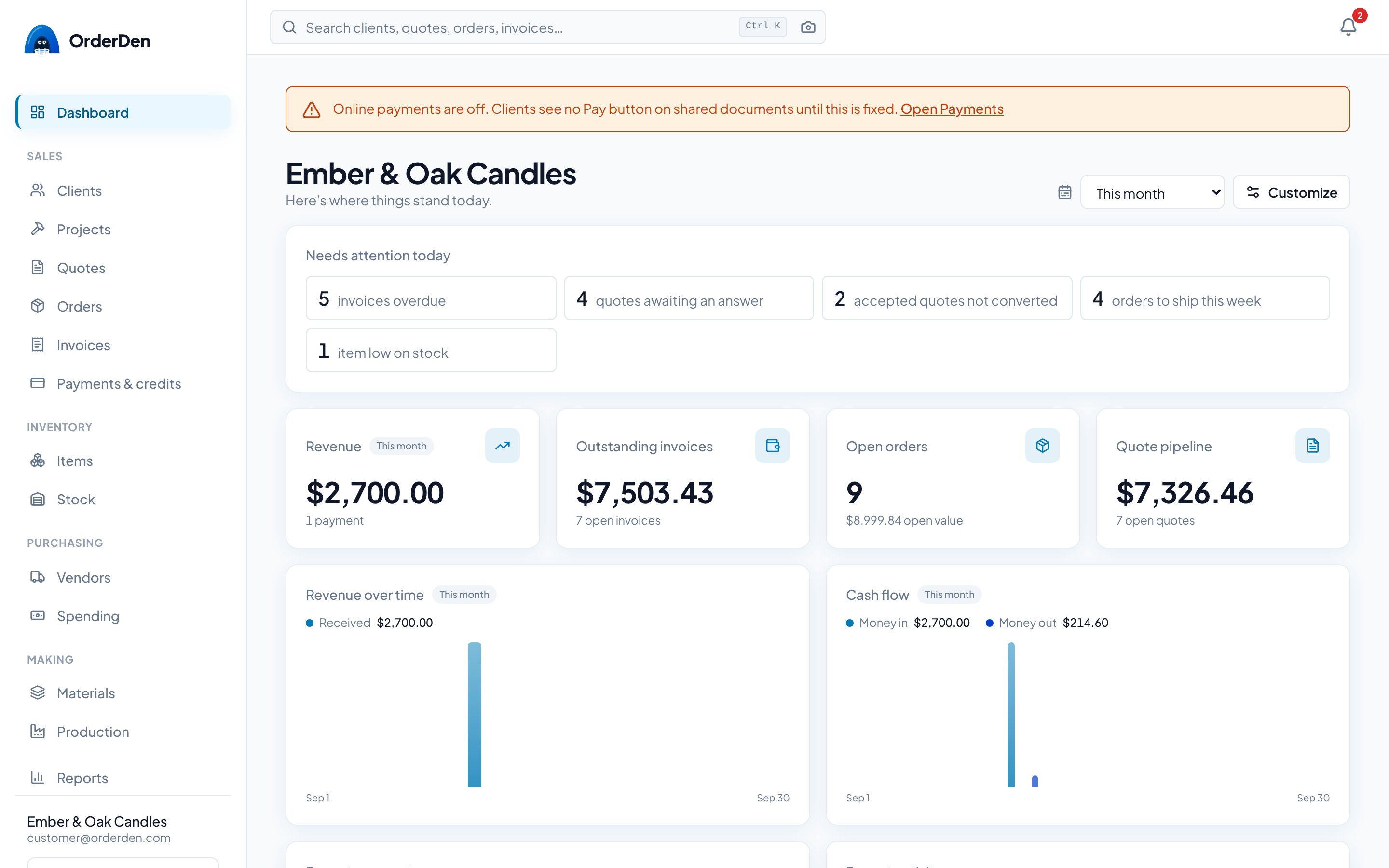
The dashboard is your home screen: a board of widgets showing the state of the business, arranged the way you want.
Where it sits
Dashboard is the first row of the sidebar, above the groups the rest of the app is arranged in (Sales, Inventory, Purchasing and Making), with Reports at the bottom. The logo brings you back here from anywhere. The full map is in Getting started.
Widget rows link to the record they name (the item, the purchase, the invoice a payment paid), so the board is also a quick way into the app.
Above the board you may see the setup checklist, a prompt to install OrderDen on your device, and on Free, a card showing your plan's use. While the setup checklist is open, the install prompt folds into one line (Install the app) that opens when you click it.
The widget board
Click Customize to add, remove, resize and reorder widgets, and Reset to go back to the default board. Drag a widget to move it, or use its Move up and Move down arrows, which also work on a phone. Your layout is saved to your profile, so each person arranges their own.
The default board has Needs attention today, Revenue, Outstanding invoices, Open orders, Quote pipeline, Revenue over time, Cash flow, Recent payments, Recent activity, Upcoming invoices, Past due invoices, Quick actions.
Add widgets groups all 36 of them:
- Metrics: Revenue, Invoiced & sold, Expenses, Net cash flow, Open orders, Outstanding invoices, Deposits outstanding, Quote pipeline, Quote win rate, New clients, Average sale, Gross margin, Inventory value, Expenses this month, Unbilled expenses, Active projects, Unbilled time.
- Charts: Revenue over time, Cash flow.
- Lists & tables: Needs attention today, Recent activity, Recent payments, Upcoming invoices, Past due invoices, Overdue by age, Expiring quotes, Orders due this week, Recent orders, Recent quotes, Top clients, Top items, Shipments in transit, Unpaid purchases, Low stock, On the bench.
- Tools: Quick actions.
A few worth explaining:
- Invoiced & sold and Average sale count the period's invoices. Revenue, Net cash flow, Top clients and Top items count the money and the goods behind them.
- Expenses, Net cash flow and Cash flow count money out from both sides: what was paid against supplier bills and the expenses recorded from receipts.
- Deposits outstanding is deposit and progress invoices raised and not yet paid. See Deposits.
- Gross margin is the margin on the period's orders as a share of their net revenue, with the card fees on combined invoices shared across their orders as on the order page. Orders with no cost data are counted but not measured, and orders with some lines uncosted are counted as partly costed; see Orders.
- Inventory value is what tracked stock on hand is worth at average cost, with how many items are low underneath. See Inventory.
- Expenses this month counts the calendar month so far, whatever range the rest of the board shows.
- Unbilled expenses and Unbilled time are money spent for a client and billable hours not yet on an invoice. See Expenses and Projects.
- Overdue by age groups what's owed 1–30, 31–60, 61–90 and 90+ days past due, the top of the AR aging report.
- Low stock lists tracked items at or below their reorder point, lowest available first. On the bench lists production runs planned or in progress; see Production.
- Needs attention today is first on the default board. Each row is a count with a link to the list behind it: invoices overdue and due today, quotes awaiting an answer, accepted quotes not yet converted, orders to ship this week, client POs waiting, client messages you haven't read and items low on stock. A row with nothing in it is left out. It uses the same lists as the morning email, so the two agree. A board you've already customized keeps its layout; add it from Add widget.
- Quick actions has buttons for a new quote, order, invoice, client, item, purchase and expense, and one to record a payment.
Gross margin and Inventory value are hidden, on the board and in Add widgets, from members who aren't allowed to see costs.
Date ranges
The period picker (today, last 7 days, last 30 days, this week, this month, last month, this quarter, last quarter, this year, last year, all time, or a custom range) drives every widget that uses a range, including Top clients and Top items. It starts at this month, and the preset you pick becomes your default. Widgets that describe right now, like the open counts and most lists, ignore it.
Orders due this week
Orders due this week lists open orders (anything not Completed or Canceled) promised on or before the end of this week, soonest first. Orders already past their promised date stay on the list, marked Overdue. Set the promised date on the order; see Orders.
Recent activity
The Recent activity widget is a live feed of what your team changes: who, which record and when. Entries link to the client and the document they're about. See Activity & history for what's logged.
Everything on this page is on the free tier: one person, the whole product, no card.
Start free